
Frequently Asked Questions

INKY helps protect your business from email-based threats using advanced analysis and artificial intelligence. With color-coded banners, you can navigate your inbox with confidence. Read on to learn how to protect yourself from email threats.

Your security matters — we’re here to support you!

What is INKY?

INKY is an email security solution that helps protect your business from phishing, spam, and other threats.

The system uses advanced analysis and artificial intelligence to scan incoming emails and determine whether they contain signs of fraud or suspicious behavior.


Why do I see banners at the top of my emails?

Banners are automatically added by INKY to help you identify whether an email appears safe or potentially dangerous.

The banner also shows:

  • Who the sender is
  • Whether the email is internal (from your organization) or external


If you see these banners, it means your company is protected by INKY.


What do the different banner colors mean?


⚪ Gray


f.eks.

The email appears to be safe.

👉 You should still:

  • Check the sender’s address
  • Make sure the email makes sense in context


🟡 Yellow

There is something unusual about the email.

For example:

  • An unexpected request
  • A message asking for sensitive information
  • Something that just feels “off”


👉 Be extra cautious:

  • Avoid clicking links
  • Do not open attachments unless you are sure


🔴 Red

The email is considered suspicious or dangerous.

This may include:

  • Phishing attempts
  • Impersonation of trusted sources (e.g. IT department, bank, etc.)
  • Fake links or manipulated sender addresses

👉 Recommendation:

  • Delete the email
  • Do not interact with its contents


What should I do if I receive a yellow banner email?

  • Check who the sender is
  • Consider whether the message makes sense
  • Be very careful with links and attachments


If in doubt, ask internally or contact IT.


What should I do if I receive a red banner email?

As a general rule:

👉 Delete the email

In some cases, dangerous emails are automatically blocked before they reach your inbox.
If you do receive one, it’s important not to click anything in it.


What is “Report This Email”?

You can use the “Report This Email” feature (Not Graymail, Spam, Phish, More…) to provide feedback on INKY’s classification.
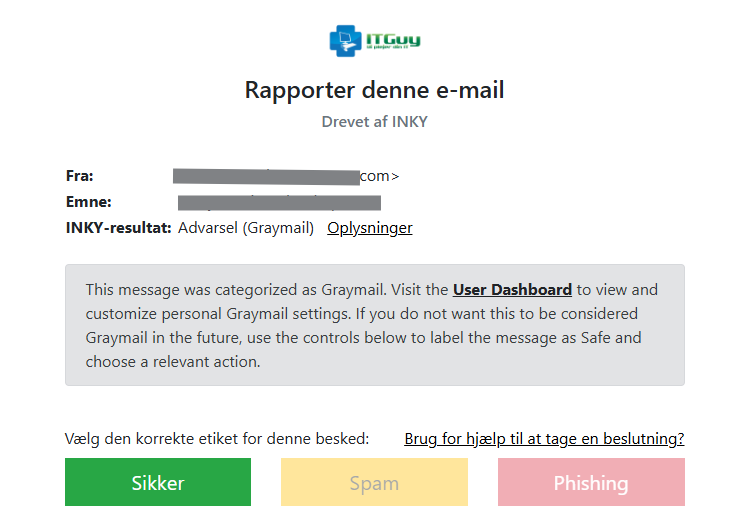
You can use it if:

  • You believe an email was misclassified
  • You want to help improve the system


Your feedback helps improve INKY’s accuracy — both automatically and through manual review.


Why am I redirected to a warning page when clicking links?

INKY checks links in real time.

If a link is considered unsafe:

  • You may be redirected to a warning page
  • Or blocked from continuing


👉 This adds an extra layer of protection even if the threat is detected after the email was delivered.


What should I do if I’m unsure?

If you are unsure about an email:

👉 Contact us at ITGuy — we’re happy to help you assess whether something is safe or not.


Where can I learn more?

You can read more about INKY on their official website.
Source: Based on information from INKY’s official documentation.


